With WordPress today you need to use custom code or a plugin to create a custom post type like "Book" or "Member." This is a popular need, and there are a variety of approaches; however, one challenge is that the end-user experience can be confusing and non-standardized.
A few weeks ago, some Automatticians and I went to the 7th CloudFest Hackathon in Rust, Germany to explore a solution for this. We started hacking on a deeply nerdy project, JSON Schema forms and fields, and ended up with a fascinating approach to an age-old question: What if you could register custom post types and custom fields directly in the WordPress admin?
Forty-eight hours turns an idea into reality
The CloudFest Hackathon is an event that allows developers from around the globe to take ideas and turn them into realities.
During the Hackathon, teams of developers from various content management systems and hosting companies come together to contribute to projects that align with the core principles of the event: the projects must be not-for-profit, interoperable, and open source.
Last year, we worked on a project that allowed us to embed WordPress directly in VS Code. We built the WordPress Playground VS Code extension on top of WordPress Playground. It uses WebAssembly to run WordPress entirely within the browser, and it turned out pretty darn slick.
This year, we focused on a JSON Schema Field/Form Renderer. While most of us explored using JSON Schema to dynamically register admin forms and fields, Dennis Snell and Adam Zieliński decided to take the project one step further! They hacked together a plugin that introduced the ability to register custom post types and custom fields directly from the WordPress admin. More notably, everything happens within the block editor—you have to see it to believe it:
This work poses some interesting possibilities for custom post type and custom field implementation because it could fundamentally change the way low- to no-code WordPress users modify their sites.
Naturally, I took the idea to Twitter/X:
I got quite a range of responses, ranging from "Heck Yes! It should have already been a core feature now. Such an integral part of every other site" to "Admin should only be for content and user management. Everything else should be configured in code and version controllable."
So why the range in responses? Let's discuss.
It turned out to be pretty simple
Dennis and Adam built our prototype using the following conventions:
- A custom post type
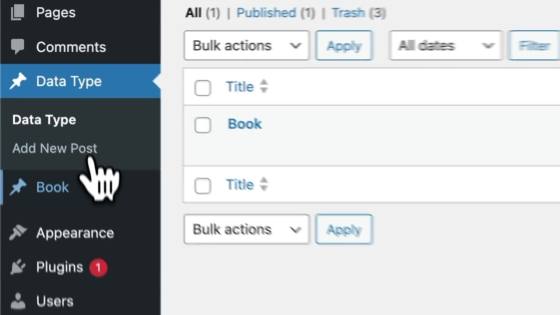
wp_data_type holds templates for user-defined data types. - The title of a post in the
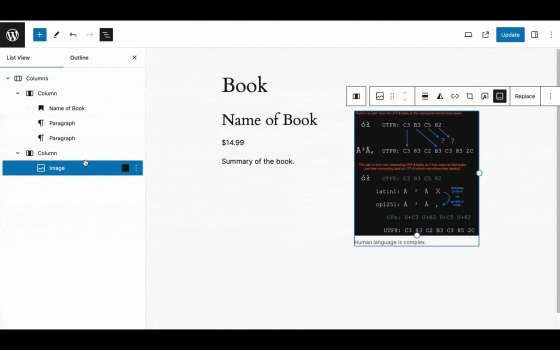
wp_data_type defines the name of the new data type. The post itself is the rendering template and comprises any set of normal blocks. Names are given to select block attributes within the post, and these names are mapped into the data type. - When creating new posts for the given data type, the locked template is copied from the
wp_data_type template, and the block attribute annotations are preserved. - Finally, when rendering the
wp_data_type template, the attributes are pulled from the individual post of the given data type and spliced into the template.
The fascinating idea is that we don't have to think about form fields; blocks already provide a rendering view and a modal editing experience. We can rely on the fundamental way blocks work and use the very same user experience to create custom data types in a way that users are already familiar with when editing a post or a site.
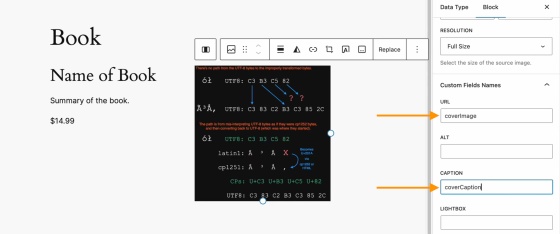
We can provide JSON-LD markup properties to the block editor using our Custom Fields Names block settings.
Custom post types define custom data types, so we use a template to not only define the data type, but also to provide a default rendering template. Each data attribute within a post type has a field where it's possible to define that field with its JSON-LD property.
For example, say you had a "Book" custom post type. A few JSON-LD properties you could define using custom fields are:
descriptioncopyrightYearauthorbookEditionbookFormatisbnnumberOfPages
We also chose to store a copy of each block attribute in the JSON attributes for that block. Since WordPress can now provide a post-to-JSON function, which merges the extracted attributes with the names assigned in the custom post type template, that template may have changed since the custom post was created. This means that no database migrations are necessary to render an updated version of a post.
The best part? The WordPress infrastructure that already exists (aka Gutenberg!) defines the data type. Because these custom posts are normal posts, and because they adopt the locked template for the data type definition, they are, in fact, renderable on their own! Even if the template has been updated and only the post itself is rendered, it will still display a meaningful representation of the data type as it was when it was created.
While our original Hackathon project was tailored towards developers and UX designers who would love to see a forms and fields API in WordPress, this prototype puts more power in the hands of low- to no-code WordPress users.
It also opens up a world of possibilities for providing a rendering view for any structured data. Imagine uploading a CSV and mapping the column names to block attributes, or connecting to a database or JSON API to map the records in the same way.
For example, if you had a CSV with business names, addresses, a rating, and a description, we could take that template post and insert a map block, a heading block, a star rating block, and a paragraph block and set the attributes to map to the CSV columns. It's essentially an instant structured data renderer!
But even if we can define custom post types and fields in the editor, should we, as a WordPress community, consider adding it to core?
The existential question: Should it exist?
Adding this kind of functionality into WordPress core could open up a ton of opportunities for the average WordPress user. Instead of needing to get a developer involved to add a custom post type to their site, a user could simply do it themselves and define the necessary fields and structured data attributes.
On the other hand, allowing everyday users, who may not have a full grasp of how custom post types and structured data should work, free reign to create these data types themselves could have detrimental effects on the user experience of their websites. Clunky or incorrect implementation of structured data markup could also cause issues with how search engines crawl these sites, causing unintended negative impacts to search traffic.
Not only that, but as of right now, if a custom post type is accidentally deleted, all of the content posted to that custom post type will no longer be accessible through the admin (even though it will still be stored in the database). The user could think they "lost" their data.
Let's talk about it
What do you think? Are you in favor of giving website owners the ability to change and customize their custom post types and attributes? Or are there some website features that should always require a more technical hand and implementer?
We'd love to chat with you about your thoughts in the comments below.
For another interesting exploration on a related idea, check out this discussion on GitHub with the core team.
Thanks to Lars Gersmann for leading the JSON Schema project with me and to everyone on the Syntax Errors team: Adam Zieliński, Dennis Snell, Julian Haupt, Michael Schmitz, Anja Lang, Thomas Rose, Marko Feldmann, Fabian Genes, Michael Schmitz, Jan Vogt, Lucisu, Maximilian Andre, Marcel Schmitz, and Milana Cap.




![[New post] Level Up Your Author HQ With GoCreate.Me](https://lh3.googleusercontent.com/blogger_img_proxy/AEn0k_uURGE2ZHBceENPuYB-I8qlV1SFIs_W_PCbEhyIjYEhpWPZ_4xyb1249EwUGB_9khuQX_Ak1xTN72xhExlUcTYtQzC9xKZLSc-dxx7dpAHBSySXbR-s7g5ooke72d4G9CZNLFiAaJI9QF7B0frnStSTZM_e-k2LbXebBqtRT-Xca7MD8zs99ozx5_JMNQ9wYg=w72-h72-p-k-no-nu)


No comments:
Post a Comment
Note: Only a member of this blog may post a comment.